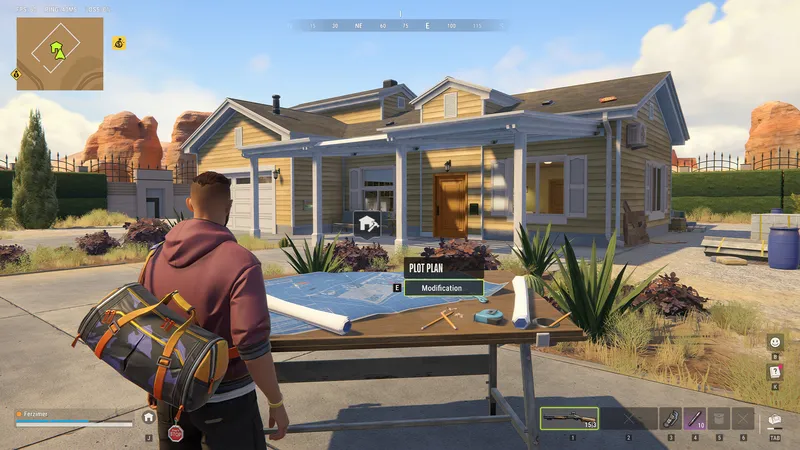
What the decoder does
Players searching for decoder robrun usually need help with the base-raiding item. Kefir’s raiding instructions identify a Security System as its target. A successful breach gives you a limited opportunity to enter a rival building, and the defender can repair security during that opportunity. This makes the item useful only when you have a plan for reaching the system, entering and finishing your objective.
Read the base raiding guide for the wider raid sequence. This page focuses on choosing the correct target, checking the item and diagnosing the point where an attempt stops. If your goal is a city robbery, the heist guide covers that activity and its preparation.
Where to get a decoder and what to check before buying
The official October FAQ describes breach decoders as scarce enough that raiders need to choose their targets carefully. The November 4 update mentions an increased decoder stack limit. The checked sources leave the current merchant, exact acquisition table and purchase price unconfirmed. Use the live item description and the current game’s inventory or trade interface to establish what is available to your character.
Before spending resources, read the complete item name, quantity and description. Compare the proposed exchange with the materials you still need for travel and equipment. Keep a record of the server and game version if you are comparing acquisition information with a teammate. An older screenshot can help identify an item, but its displayed stock and exchange requirements may have changed after an update.
If you find a decoder in a recent session, note the acquisition method alongside the date and region. That record helps distinguish an observed source from a route someone remembers from a playtest. Check how many items remain in the stack before leaving for a raid, especially after a previous attempt or inventory transfer.
Use a decoder in four stages
Check the building and Security System
Find the intended rival building and inspect the Security System interaction. Confirm the target before committing supplies. Take a moment to identify the entrance, nearby cover and the path back to your vehicle or regroup point. Share the building description with teammates so everyone approaches the same objective.
Prepare the item and your team
Keep the decoder available through the inventory controls presented by your current game version. Read the interaction prompt and any displayed requirements. Agree who will operate the system and who will watch the approach. Choose an exit condition before starting, such as an arriving defender or equipment running low.
Follow the displayed interaction
Use the decoder on the Security System and observe the feedback. Verify that the interaction has completed before telling teammates to move. If a message appears, record its exact wording and check the item quantity afterward. Repeating an action without reading the result makes it harder to determine whether the problem is the target, the item or the connection.
Use the temporary access promptly
Move through the opened access and complete the objective you prepared. Stay aware of the owner’s ability to repair security. Keep your team updated when a door or interaction changes, and leave while your planned route is available. Once the attempt ends, record the resources used and whether the building’s security was repaired during it.
Timing, success and the defender’s response
Kefir’s published instructions establish the temporary-access mechanic. They leave the exact timing and numerical success formula unspecified. Treat the game’s current feedback as the basis for the immediate decision. A timer or progress display on your screen is specific to that interaction and version.
From a planning perspective, the important variables are practical ones you can observe. Measure how long your group takes to reach the entrance after the interaction. Notice whether a defender responds quickly and whether another approach is available. Review the amount of equipment you risk for the goods you actually bring home. These observations help improve coordination without requiring an assumed success percentage.
Five common problems to investigate
The target shows no decoder interaction
Read the target’s label and compare it with the Security System described in the official help. Check your position and the current interaction prompt. A safe, storage object or unrelated door can have its own access requirement. Avoid assigning every locked object the same item requirement.
The expected item is missing from your inventory
Review the item name and stack before retrying. Check recent transfers, purchases and the previous attempt’s result. If you still have an acquisition screenshot, compare its item name with the one you currently hold. This is a useful point to stop and prepare again.
Access closes while the raid is in progress
The owner can repair the system and end access. Tell your team when the building’s state changes and reassess the exit. A quick repair response explains why an earlier successful interaction may no longer leave the entrance available.
The interaction stops during a connection problem
Record any error text and check the server status page. If the game displays an error code, use the error-code guide to identify the appropriate troubleshooting step. Return to a stable session before committing additional supplies.
An old guide promises a different result
Compare the guide’s date with the installed game version and current item wording. The November stack-size change already demonstrates that decoder-related details can change. Keep recent observations together so your group can explain a discrepancy precisely when reporting it.
Prepare the return trip
The map guide helps identify destinations and plan what happens after a raid. Decide where the goods will go, who will carry them and how much storage is ready. Include travel and replacement costs when reviewing whether the attempt was worthwhile. For your own property, work through the base security checklist before logging off or leaving on another trip.
After a failed attempt, write down the target, visible message, item count and sequence of actions while the details are fresh. A short factual record is easier to compare with a teammate’s view than a general report that the decoder failed. It also gives support a specific interaction to investigate if the same problem continues after a clean restart.
Quick answers
What does the robrun decoder open?
Kefir confirms its use on a rival player’s Security System for temporary building access. The owner can repair the system and close that access.
Do you need to buy a decoder?
You need a breach decoder to get into a secured rival base. Kefir’s October 2 FAQ says it is not an item you can simply buy off the shelf.
Can a decoder open every safe?
The confirmed decoder interaction is with a base Security System. Kefir separately mentions keys for safes. Check the item and target interaction in your installed version.
Does the decoder have a fixed success rate?
Kefir has not published a fixed percentage. Check the Security System’s feedback to see whether the breach worked. After you gain access, the owner can repair the system and lock you out.
Sources & updates
Last updated:
- How do I raid other players' bases? — Kefir
- How do I protect my base from raids? — Kefir
- October 2 FAQ, November 4 server update and November 13 FAQ — Kefir Steam announcements
Official screenshots and gameplay clips © Kefir, from the Steam store. Early Access details may change with updates.